Auto-translated ·
Free Transform: a complete distortion toolkit for Figma
Scale, rotate, skew, warp, bend, or apply perspective… do it all right in Figma, without needing to jump to Photoshop or Illustrator anymore.
The plugin was built by a designer who has been working with Figma for over 6 years, born from the frustration of having to export files to Adobe just to use Ctrl+T, then dragging them back into Figma without being able to adjust them. Every action is designed to be familiar to Adobe users, so it's easy to understand.
Basic toolkit
- Distort, Perspective: pull corners, warp, create free perspective
- Envelope, Warp: bend, reshape in many available styles
Advanced tools
- Plane Warp: apply artwork to a 4-point plane, create screen mockups, packaging, signs in seconds
- Pin Warp: pin down and bend layers smoothly, similar to Puppet Warp in Photoshop
- Custom Mesh Warp: distort according to a mesh, adjusting each point
- Fit to Quad, Fit to Shape: fit objects into a 4-point frame or along the actual outline of a shape, including curves
- Preset: save frequently used settings, apply them with just one click
- Batch Transform: apply one action to multiple layers at once
Who is it for?
Graphic designers, mockup creators, packaging designers, social post creators, and anyone familiar with Adobe who wants to complete their workflow directly in Figma.
The plugin is continuously being improved, and we look forward to receiving feedback from everyone 🙏
Latest updates
V50
Latest7 năm làm graphic trên Figma và bản Pro mình ấp ủ bấy lâu đã ra mắt rồi nè ✨1 months agoChào mọi người 👋
Chắc có bạn còn nhớ Free Transform mà mình từng chia sẻ ở đây hồi mới ra mắt. Cảm ơn mọi người đã dùng, góp ý và ủng hộ suốt thời gian qua nha. Hôm nay mình quay lại với một thứ mình dồn khá nhiều tâm huyết.
Mình dùng Figma hơn 7 năm rồi, và làm graphic trên đó cũng nhiều chứ không chỉ UI. Suốt ngần ấy năm có một chuyện làm mình đau đáu mãi: hễ cần uốn, bóp phối cảnh hay ốp mockup là lại phải qua Photoshop, Illustrator làm, xuất file rồi kéo ngược vào Figma. Mà kéo vào rồi thì không chỉnh được nữa. Khách bảo "sửa xíu thôi em" là lại chạy nguyên vòng từ đầu, vừa phiền vừa mất thời gian 🥲
Free Transform ra đời từ chính nỗi khổ đó. Còn Free Transform Pro là phần mình luôn mong có, để cả workflow graphic được nằm gọn trong Figma:
- Plane Warp: ốp artwork lên bất kỳ mặt phẳng 4 điểm nào. Màn hình, bao bì, biển hiệu, vài giây là xong.
- Pin Warp: cắm vài cái pin rồi uốn layer mềm mại, y như Puppet Warp.
- Liquify: đẩy, kéo, bóp hình thoải mái khi cần cảm giác tự nhiên hơn.
- Custom Mesh: biến dạng theo lưới, chỉnh được tới từng điểm.
- Batch processing: áp một thao tác cho cả loạt layer cùng lúc, khỏi làm từng cái.
- Xuất Ultra quality: file sắc nét, yên tâm gửi in hay giao file độ phân giải cao.
- Preset & Re-edit: lưu thiết lập hay dùng, và quay lại chỉnh tiếp ngay trong Figma, không phải làm lại từ đầu.
Có một điều mình rất muốn giữ: bản miễn phí vẫn y nguyên, không khoá bớt tính năng nào mọi người đang dùng. Pro chỉ bổ sung thêm công cụ mới thôi.
Pro hiện đang ở giai đoạn beta, nên chắc vẫn còn chỗ chưa mượt. Mọi người dùng thử thì cho mình xin góp ý nha: gặp bug, trường hợp lạ, hay kiểu "giá mà nó làm được cái này…" đều quý hết. Nhờ vậy mà plugin mới ngày một tốt hơn.
👉 https://www.figma.com/community/plugin/1648207154922389186/free-transform
Cảm ơn mọi người nhiều nha. Chúc cả nhà uốn nắn vui vẻ! 🙌
t/free-transform
4 days ago·23
Free Transform: distort, phối cảnh, mockup ngay trong Figma, không cần qua lại Photoshop
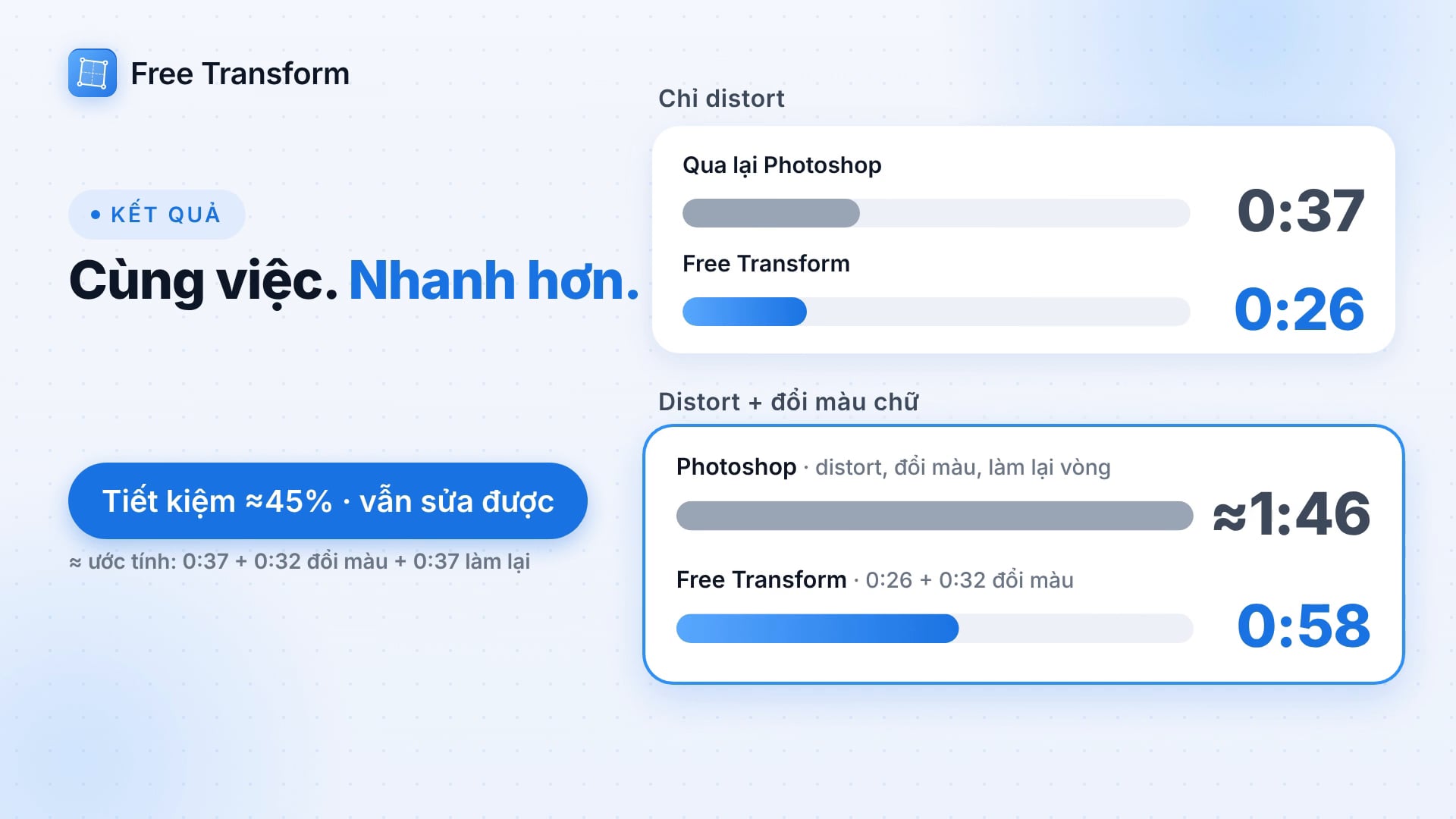
Mình làm một bài test bấm giờ thật: cùng một thiết kế, cùng một người làm, cùng một thao tác distort. 🔴 Cách cũ: Copy as PNG, sang Photoshop dán vào, Ctrl+T, Distort, kéo 4 góc, Copy SVG, quay về Figma dán lại. Mất 0:37, và kết quả chỉ là
Discussion
about 1 month ago·26
7 năm làm graphic trên Figma và bản Pro mình ấp ủ bấy lâu đã ra mắt ✨
Chào mọi người 👋 Chắc có bạn còn nhớ Free Transform mà mình từng chia sẻ ở đây hồi mới ra mắt. Cảm ơn mọi người đã dùng, góp ý và ủng hộ suốt thời gian qua nha. Hôm nay mình quay lại với một thứ mình dồn khá nhiều tâm huyết. Mình dùng Figm
Announcement
2 months ago·28
Free Transform Pro sẽ ra mắt trong Tháng 9 này 🎉
Sau V49 với Live Preview, mình đang tập trung hoàn thiện Free Transform Pro, dự kiến ra mắt trong tháng 9. Bản Pro sẽ bổ sung nhiều công cụ nâng cao như tùy chọn Warp mở rộng, lưu và tái sử dụng preset, xử lý nhiều layer cùng lúc, cùng khả
Announcement


Reviews & comments